Remote access setup in the archive. Historical Windows session-management notes for authorised administrators.
remote access how to – We saw previously ONE method to log off a user, that was the clean way of gaining remote desktop. There is another way, a dirty way but it works none-the-less, and gains your remote desktop: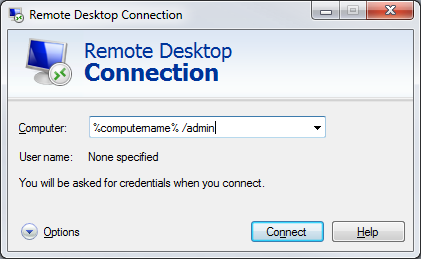 This approach gives you remote access (sitting in front of the machine/console). Add the /Admin switch in the mstsc box.
Additional to this, you will approach also has the ability of allowing you to install some programs that will only install via console.
Related reading: Data Centre Cabling: Comparing Layouts.